Google announced Gemini 4 Hydrogen on November 12, 2026 and calls it its “daily driver for agentic workflows,” a fast model for everyday coding and multi-step AI work. Instead of repeating a speed claim, this tutorial gives you three small tasks whose results you can check yourself: a web page, a structured extraction and a source-grounded comparison. It also shows how to read the access rules, token limits and thinking levels that decide what you can actually run. Google’s launch post and developer announcement identify the supported starting points. The checks below are our suggested evaluation workflow, not Google’s.
Editorial review pending — Imran Khan Pathan, Editor at AI Tech Safar. Documentation checked on November 17, 2026 against Google’s launch post (last updated November 13), its model reference and developer guides, and independent coverage. This combines documentation with the previously recorded Google AI Studio exercises shown below. Those runs used gemini-4-hydrogen with High thinking. They are small practical checks, not a controlled benchmark; the screenshots are retained from those runs, not a new test in this update. Prices and limits can change, so check Google’s current pages before you rely on a number.
In this tutorial
- Overview: access is the first test
- TL;DR
- Gemini 4 Hydrogen at a glance
- 1. Choose your Gemini 4 Hydrogen starting point
- 2. Keep a run log from the start
- 3. Task one: build a page with a clear acceptance checklist
- 4. Task two: extract facts without inventing missing values
- 5. Task three: separate source evidence from analysis
- 6. Compare thinking levels fairly
- 7. Limits, pricing and cost
- 8. Troubleshooting checklist
- What Google claims and what we have not verified
- Our Read
- Frequently asked questions about Gemini 4 Hydrogen
- Related reading
- Useful sources
Overview: access is the first test
The same model family can appear in a consumer app, a developer console and a paid coding product with different controls. Confirm the actual surface and model available to your account before following somebody else’s screenshot. A model answering through automatic routing is not the same as a run where you explicitly selected and recorded it, and the difference decides whether your test means anything.
Hydrogen sits below Google’s frontier models. Google positions Gemini 4 Carbon and Gemini 4 Argon for deep, long-horizon reasoning on hard problems, and Hydrogen for rapid execution such as writing code, running tests and verifying changes. It can work alone or alongside Carbon and Argon in multi-model workflows.
TL;DR
- Google announced Hydrogen on November 12, 2026. That is the launch date, not a November 16 launch.
- Free Gemini app users get Hydrogen through automatic model selection when it suits the prompt. Do not promise a manual Hydrogen selector to every free user.
- Google lists AI Studio and the Gemini API for developers. Google Antigravity access in this launch is tied to paid Google AI Pro or Ultra subscriptions.
- Google’s launch post gives list pricing of $1.50 per million input tokens and $7.50 per million output tokens, flat across the 1 million-token window.
- The technical documentation for the Gemini 4 family describes a combined input and output token budget, not two independent million-token allowances.
- The screenshots below show three recorded practical exercises. We have not run a controlled Hydrogen benchmark for this article.
Gemini 4 Hydrogen at a glance
| Item | What the documentation says |
|---|---|
| Announced | November 12, 2026 |
| Model ID (API) | gemini-4-hydrogen |
| Positioning | Fast, cost-efficient model for everyday coding and agentic workflows |
| Thinking levels | Low, medium, high (default) and a new xhigh tier. Carbon and Argon default to medium and top out at high. |
| Context | 1,048,576 tokens shared by input, thinking and output, according to the Hydrogen technical model reference |
| List price | $1.50 per million input tokens and $7.50 per million output tokens, flat across the full window (Google’s launch post) |
| Input types | Text, images, audio, video and PDFs (launch post) |
| Safety documentation | A published model card, linked from the launch post |
1. Choose your Gemini 4 Hydrogen starting point
Google’s launch post describes a rollout across consumer, developer and business products. Its footnote matters: in the Gemini app, free users receive Hydrogen through automatic model selection when it is the right model for the prompt. If you need a repeatable, model-specific experiment, record an explicit model selection in a supported developer surface instead of guessing the backend from the style of an answer.
| Where | Who it is for | What to know |
|---|---|---|
| Gemini app | Everyone | Appears in the model drop-down. Free users get it through automatic selection when appropriate. |
| Google Search | All users | Used to upgrade Search responses. You do not choose the model. |
| Google AI Studio and the Gemini API | Developers, all tiers | The best place to select Hydrogen explicitly and record the model ID. |
| Gemini for business | Enterprises | Available through the API or the model drop-down. |
| Google Antigravity | Paid Google AI Pro and Ultra subscribers | Includes the Orchestrator, which switches between models such as Carbon and Hydrogen in one session. |
| Android Studio | Android developers | Listed in the developer announcement. |
| Gemini in Google Sheets | Google AI Pro and Ultra first; eligible business subscriptions | Rolling out starting with paid tiers. |
Open the official product you already use and inspect which models your account offers and what billing applies. Do not enable a paid API project just to follow this guide. A consumer subscription, console access and API usage are separate questions. If Hydrogen is not listed for you, report that result and check Google’s availability pages. Do not substitute another model and label the output Hydrogen.
For developers, Google’s documentation lists the model ID gemini-4-hydrogen and the low, medium, high and xhigh thinking levels, with high as the API default. That is a technical API detail, not a promise that every consumer interface shows those controls.
Our setup for the screenshots
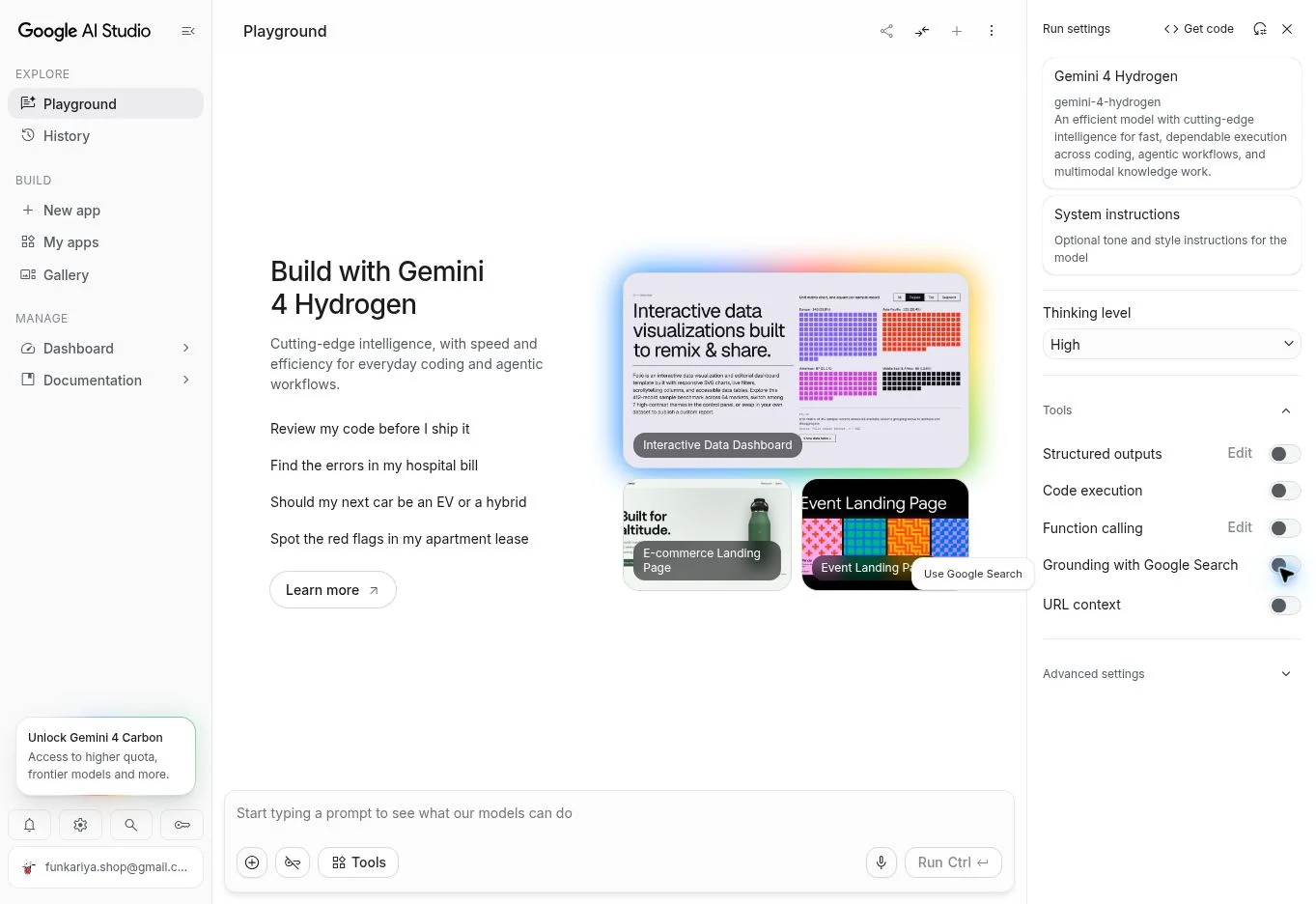
We used Google AI Studio with Hydrogen explicitly selected, High thinking, and Google Search grounding, URL context, code execution and structured-output mode switched off. Each main task started in a fresh chat. The document test used pasted fictional policies, so it did not test live web retrieval. The first coding request returned a permission error; one retry produced the HTML file. That error alone does not establish its cause or a general access limitation.
2. Keep a run log from the start
Every result in this tutorial depends on what you ran. Before the first prompt, create a simple log so you can compare runs honestly later.
| Field | Example entry |
|---|---|
| Date and time | November 17, 2026, 10:30 |
| Surface | AI Studio, or Gemini app with automatic selection |
| Model selected | gemini-4-hydrogen chosen explicitly, or “automatic, unknown” |
| Thinking level | High (default), or “not exposed” |
| Prompt version | Task 1, prompt A |
| Result | Pass, partial or fail, with the reason |
| Tokens and time | Copy them if the interface shows them |
If your surface does not let you choose the model, write “automatic” in the log and treat the result as a test of that product, not of Hydrogen specifically.
3. Task one: build a page with a clear acceptance checklist
A single-file page is a useful first experiment because you can define the expected behavior before generation. Use fictional text and no checkout, login or customer data. The goal is to see whether the model follows constraints and responds well to a specific correction. Google highlights this kind of work, such as live UI prototyping and design-to-code iteration, as an area where Hydrogen aims to produce working layouts in fewer prompts. Whether that holds for your case is what this task tests.
Build a single HTML file for a fictional weekend photography workshop. Include embedded CSS, a date, a three-item agenda, an accessible contact form mockup and a FAQ. Use no external libraries or tracking. The form must not send data. Make it readable at 360px wide. Return the complete file and explain how to preview it locally.
Before you run anything, read the generated file and confirm it has no unexpected remote scripts or form destination. Preview it locally in an appropriate environment. Use this acceptance checklist and score each line as pass or fail:
| Check | How to test it |
|---|---|
| No external resources | Search the file for http, src= and script. Nothing should load from outside. |
| Form is a mockup | Look at the form tag. It should have no real action or submit destination. |
| Agenda has three items | Count them. |
| Readable at 360px | Narrow the browser window to 360px. No horizontal scrolling, no clipped text. |
| Accessible labels | Every input has a visible label tied to it. |
| Preview instructions work | Follow them exactly as written. |
If something fails, use a follow-up that names the real defect. For example, if the agenda overflows at 360px:
At 360px the agenda overflows horizontally. Change only the CSS needed to fix that problem. Preserve all text and the mock form behavior. Explain the change and give me a short checklist to verify it.
Use that prompt only if you actually observe the issue; otherwise describe the defect you saw. Save both outputs. The useful evidence is whether the revision fixes the reported problem without introducing another one. A “surgical” edit that leaves unrelated parts untouched is one of the behaviors Google claims for Hydrogen, so compare the file before and after to see whether anything else changed. Do not call code production-ready because the model says it is.
What happened in our coding run
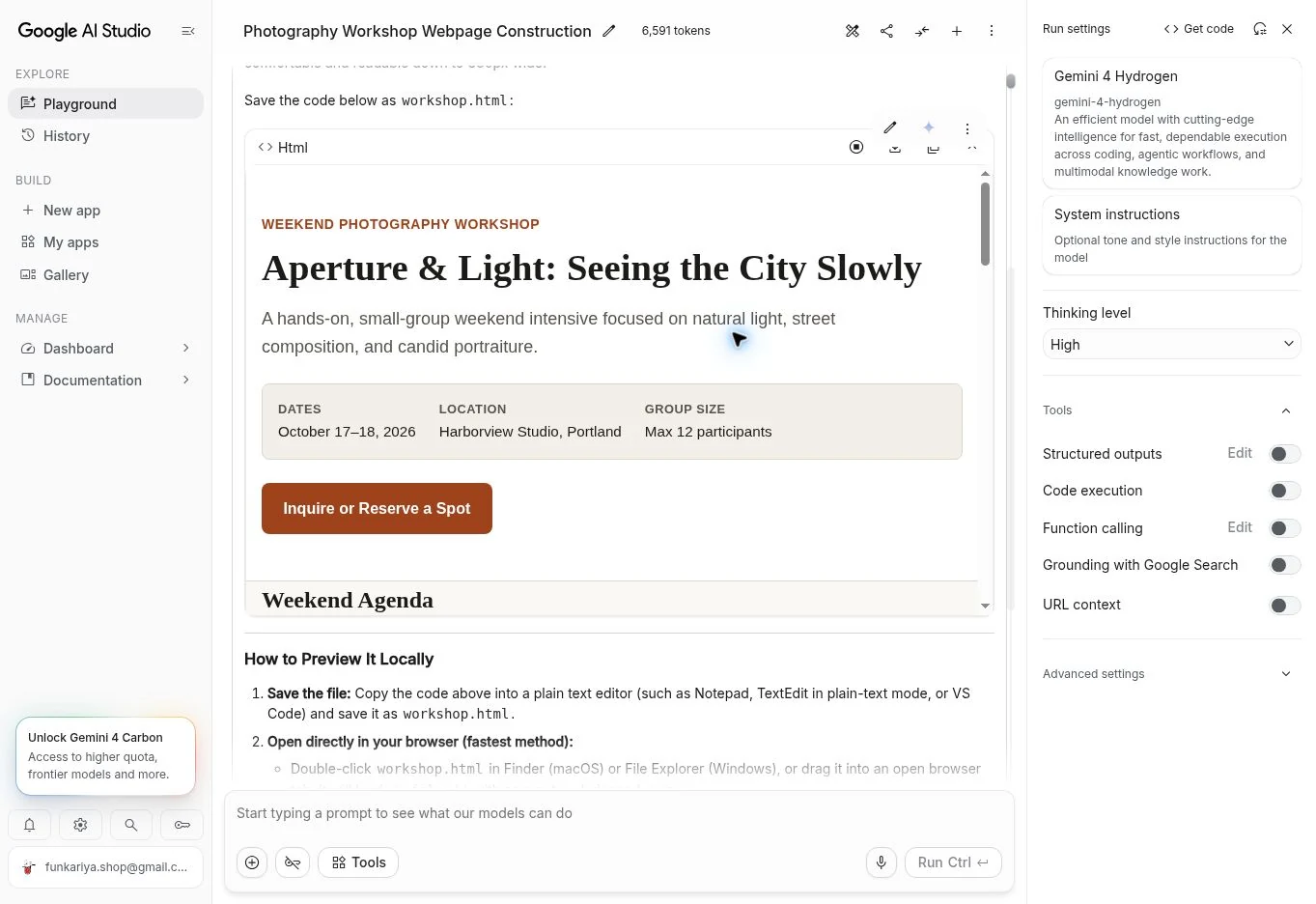
Hydrogen returned a complete single HTML file called workshop.html for an “Aperture & Light” workshop. We inspected the generated source: it contained embedded CSS, no remote HTTP/HTTPS resource URLs, matching form labels and a submit handler that called event.preventDefault(). The preview displayed a date, a three-item agenda, FAQ controls and the contact form.
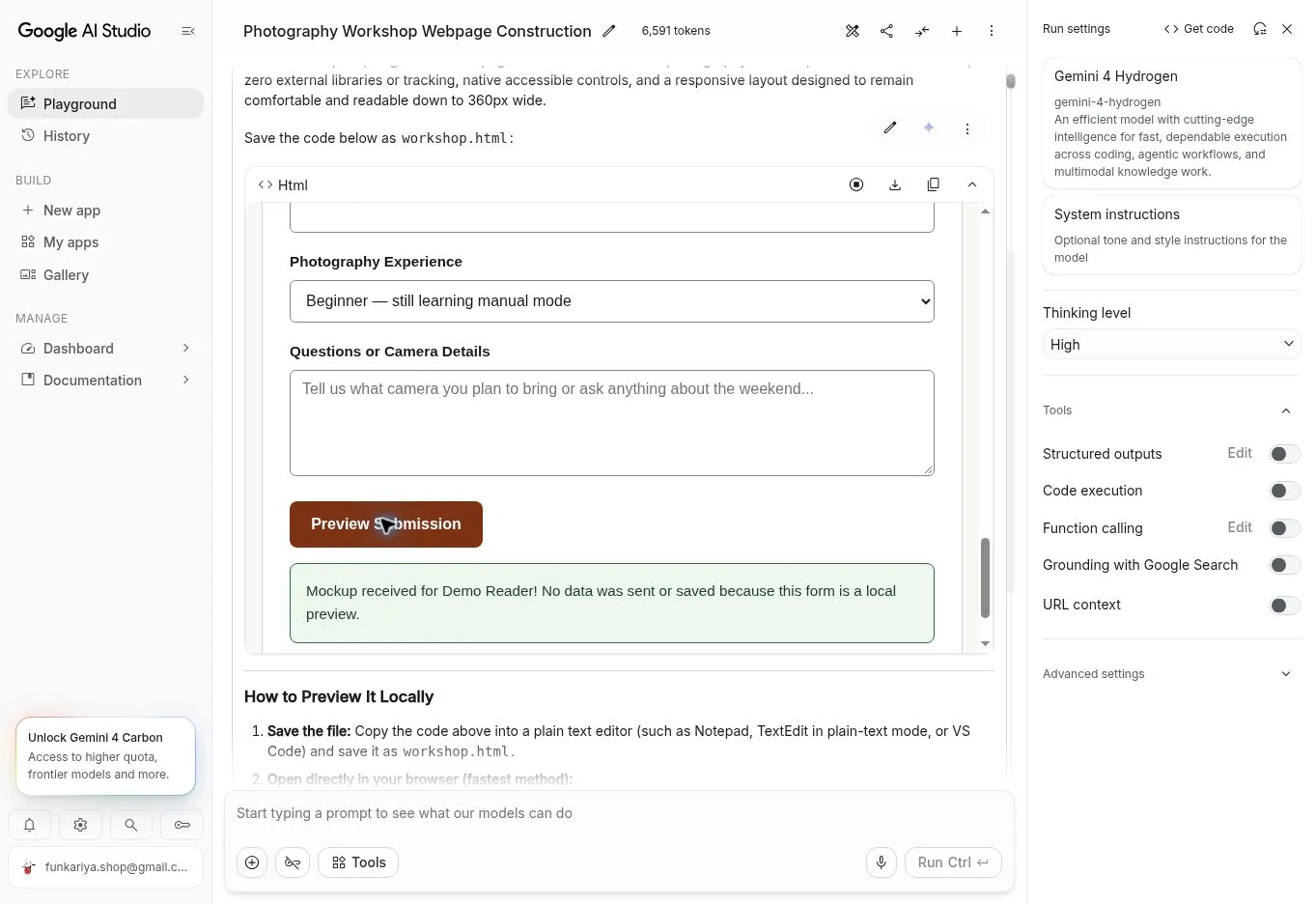
We entered the fictional name Demo Reader and reader@example.com, then clicked Preview Submission. The preview showed a local confirmation and reset the form. The source review found no fetch, XMLHttpRequest or other network-submission code. This was a source-and-behaviour check, not a network-packet audit. The chosen sample dates were October 17–18, 2026, already past when we tested; replace them before adapting the page for a real future event.
We did not complete a dedicated 360px viewport test or a full keyboard/accessibility audit. Keep those checklist items open rather than treating the desktop screenshot as proof of mobile readiness. We also did not send the sample overflow follow-up because we had not established that defect in the workshop page.
4. Task two: extract facts without inventing missing values
Give the model a tiny input where every field is visible. That lets you tell an extraction error from a research error. Keep an intentional missing field so you can see whether the model follows your instruction about uncertainty.
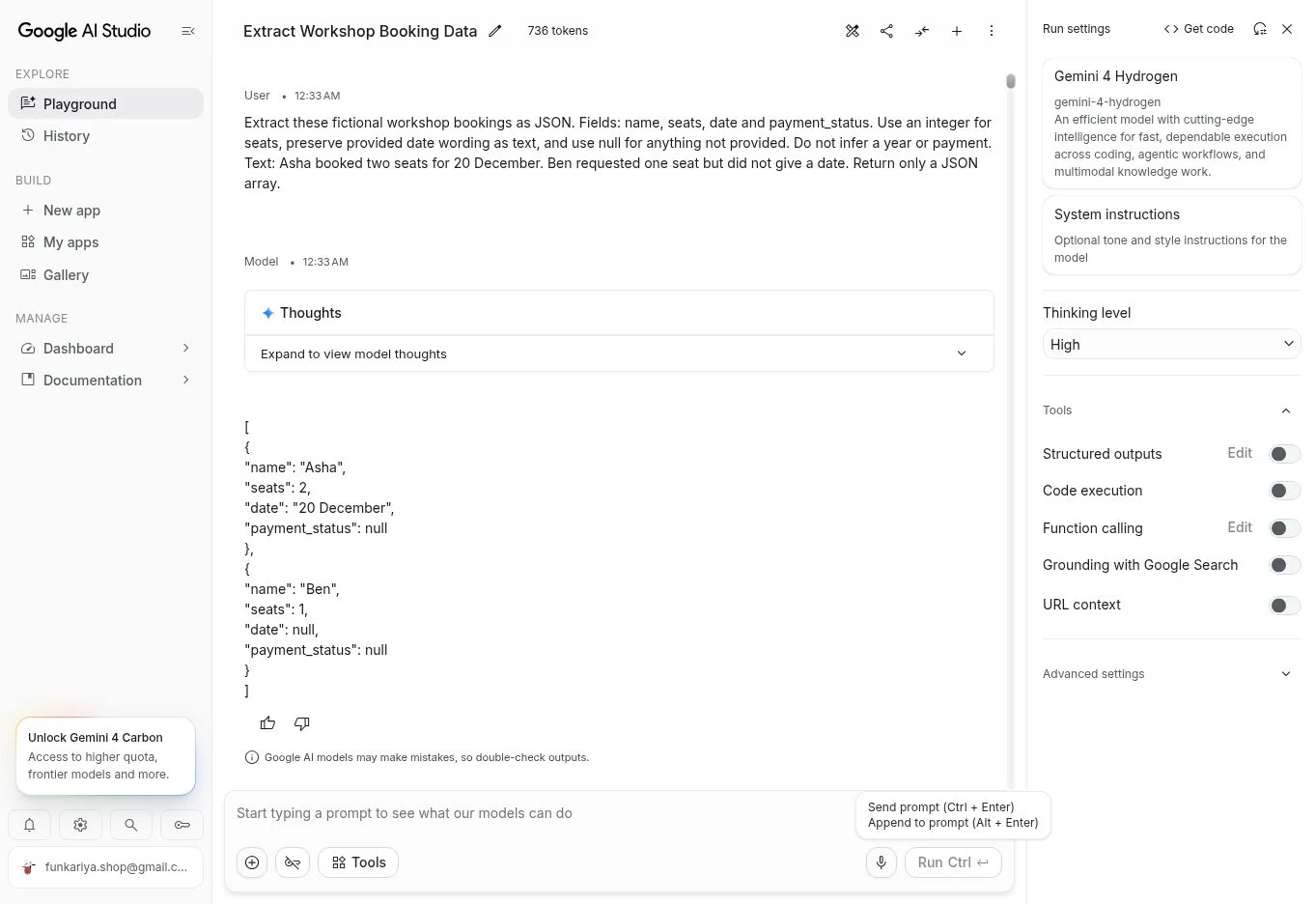
Extract these fictional workshop bookings as JSON. Fields: name, seats, date and payment_status. Use null for anything not provided; do not infer payment. Text: Asha booked two seats for 20 December. Ben requested one seat but did not give a date. Return only a JSON array.
The expected result has two entries. Asha has two seats and the date 20 December. Ben has one seat and a null date. Both payment statuses are null, because the text never mentions payment. If the output says either person paid, the model invented information. If it adds fields you did not ask for or wraps the JSON in commentary after you said “only a JSON array,” it ignored an instruction. Keep the original input next to the answer. For a business workflow, that kind of audit is more useful than a vague claim that a model is good at data.
Two follow-up tests make the exercise sharper. First, add an ambiguous line such as “Chen might come with a friend, maybe on the 21st” and ask for an ambiguity flag instead of a confident interpretation. Second, add a duplicate booking for Asha and see whether the model merges it silently or points it out. Only move to real documents once you understand the account’s data controls and have permission to use the material. This tutorial does not require uploading private invoices.
What happened in our JSON run
The response contained a JSON array with Asha and Ben, integer seat counts of 2 and 1, Asha’s date preserved as “20 December”, and null for Ben’s date and both payment statuses. It added no year or payment assumption. That passes this small extraction check; the optional Cara ambiguity follow-up has not been run.
5. Task three: separate source evidence from analysis
Use two short public documents you can open yourself, such as the eligibility pages of two similar services. Ask for a comparison tied to those documents, then manually check the most important claims. If your chosen surface cannot retrieve a link, paste an excerpt with its source and date instead of assuming the model read it.
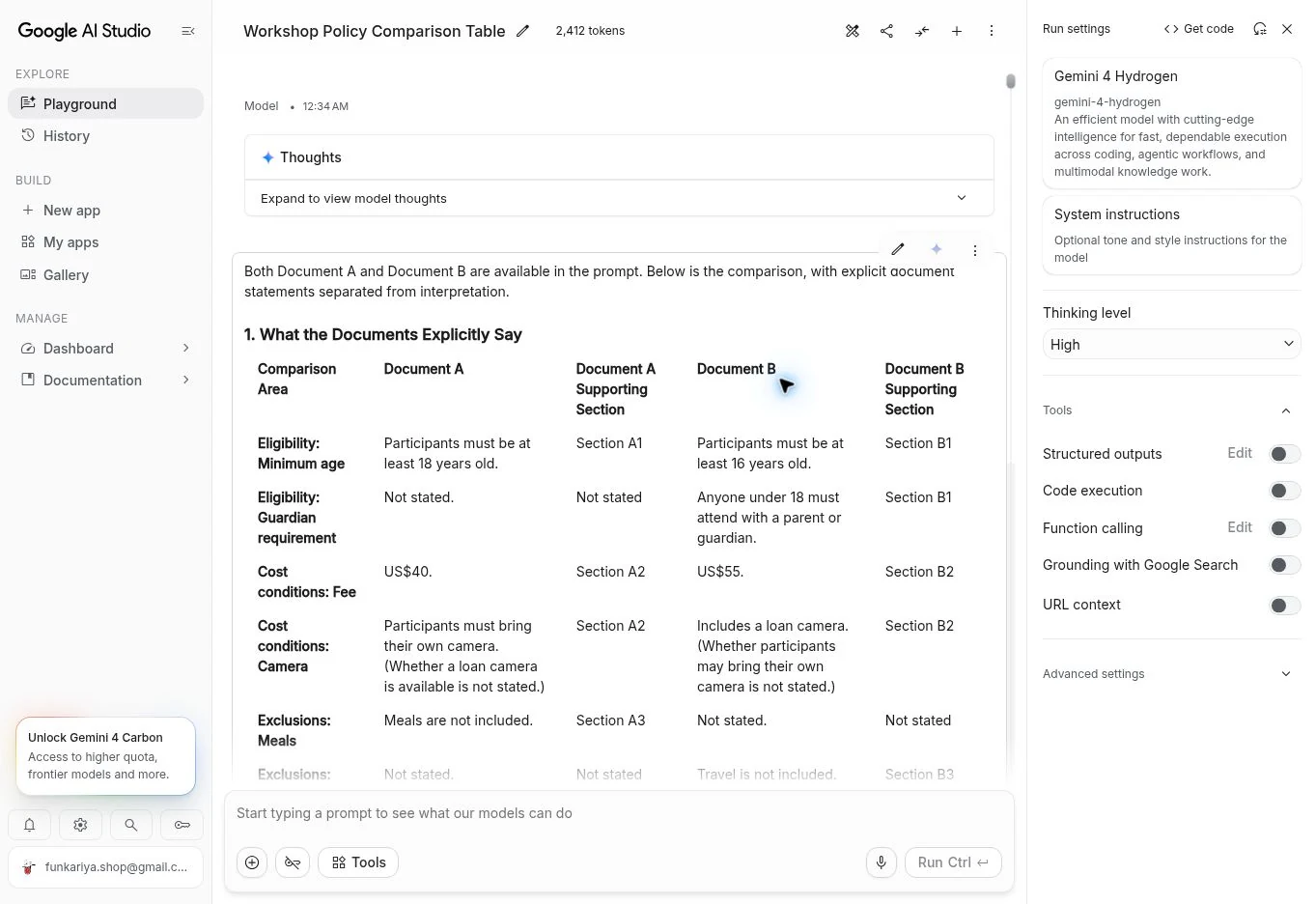
Using only the two documents I provide, compare eligibility, cost conditions and exclusions. Give a table with the exact supporting section for each claim. Mark missing information as not stated. Separate your own interpretation from what the documents explicitly say. If you cannot access a source, tell me before answering.
Check three things: whether the cited section exists, whether it supports the exact claim, and whether a later or more specific source changes the answer. A real link can still be irrelevant. An older announcement can also be accurate at publication while a current help article describes a changed rollout. Google says Hydrogen cuts fabricated claims by more than five times compared with Gemini 3.8 Flash. That is a vendor-reported result on its own tests, and your two-document check is a small way to test the behavior yourself.
| Task | Success criterion | Failure to record |
|---|---|---|
| Web page | Meets the stated layout and behavior checks | Unexpected scripts, overflow or changed requirements |
| Extraction | All values trace to supplied text | Invented dates or payment status |
| Research | Claims match accessible source sections | Real-looking citations that do not support the claim |
What happened in our document comparison
For this run, we used two editor-written fictional policies, pasted directly into the prompt. They are exercise inputs, not public workshop offers. Here are the exact source texts so you can repeat the check:
Document A — fictional workshop policy, prepared for this test, 17 November 2026. Section A1 Eligibility: Participants must be at least 18 years old. Section A2 Cost: The fee is US$40. Participants must bring their own camera. Section A3 Exclusions: Meals are not included. Section A4 Cancellation: Cancel at least seven days before the workshop for a full refund.

Document B — fictional workshop policy, prepared for this test, 17 November 2026. Section B1 Eligibility: Participants must be at least 16 years old. Anyone under 18 must attend with a parent or guardian. Section B2 Cost: The fee is US$55 and includes a loan camera. Section B3 Exclusions: Travel is not included. No cancellation or refund terms are provided in Document B.
Hydrogen’s table gave the correct minimum ages and fees, linked them to A1/B1 and A2/B2, and kept the meals/travel omissions as “not stated” for the opposite document. It separated interpretation from the policy statements. It mentioned the cancellation terms outside the main table as a scope note, rather than presenting an unstated Document B refund policy as fact.
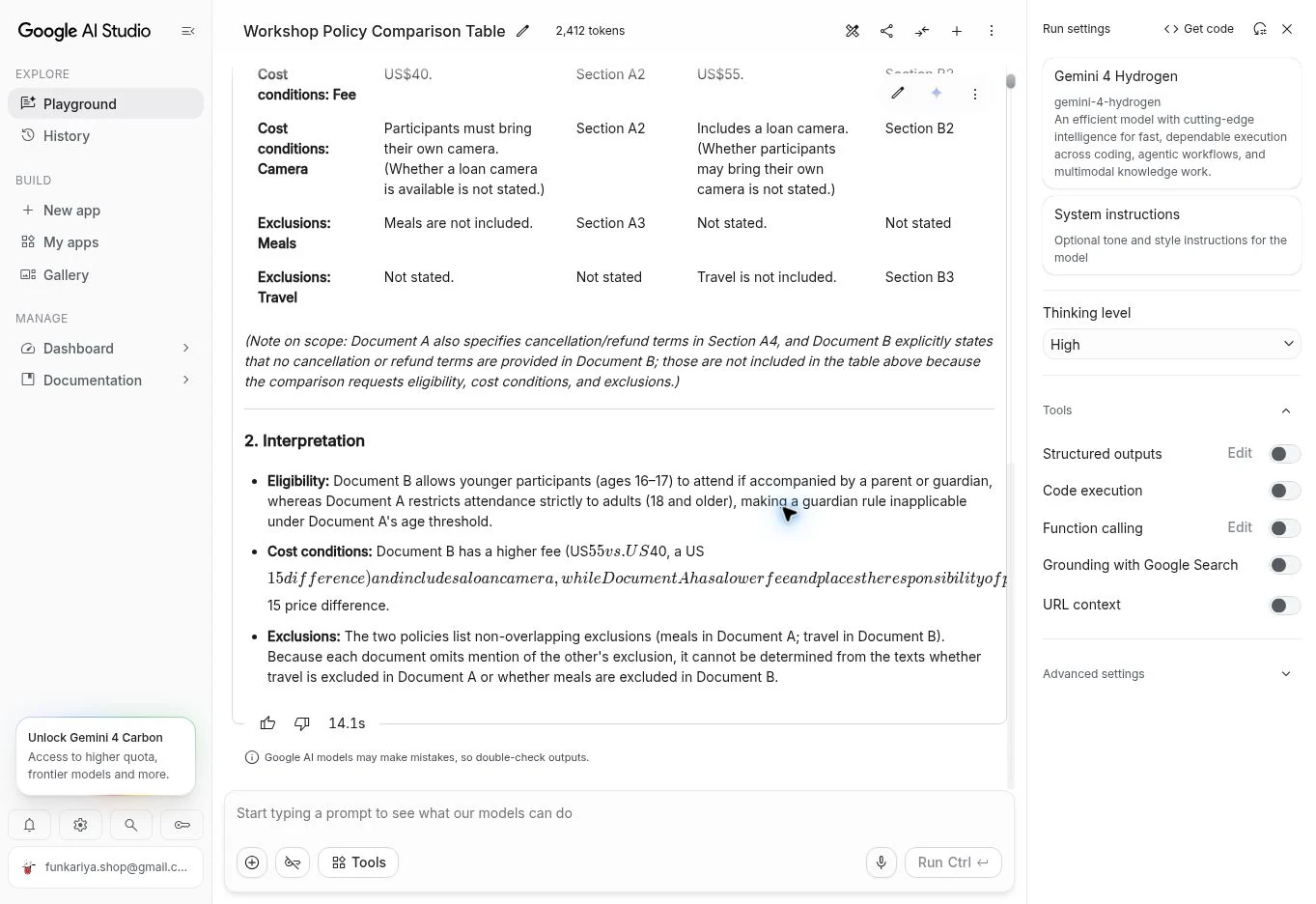
The first interpretation had a presentation problem: dollar-sign text rendered partly as mathematical notation and overflowed the response area. The comparison facts were useful, but the paragraph needed a correction. This is an observed rendering defect; it does not establish whether the model output, the app renderer or their interaction caused it.
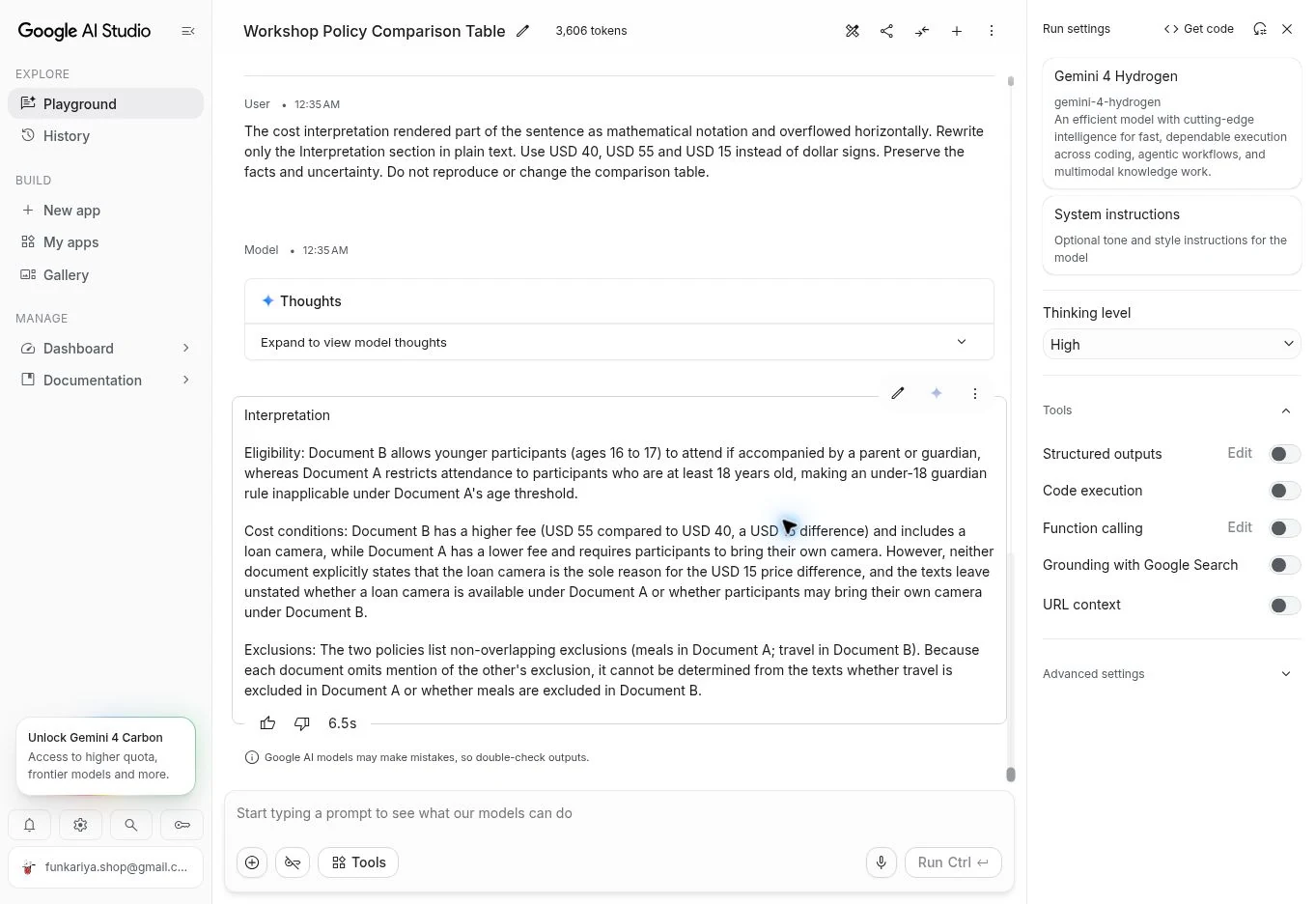
The cost interpretation rendered part of the sentence as mathematical notation and overflowed horizontally. Rewrite only the Interpretation section in plain text. Use USD 40, USD 55 and USD 15 instead of dollar signs. Preserve the facts and uncertainty. Do not reproduce or change the comparison table.
The follow-up returned only the interpretation section, with readable USD 40, USD 55 and USD 15 amounts. It preserved the age and guardian distinctions and the warning that the documents do not establish why the prices differ. The earlier table remained in the conversation. This is the kind of narrow revision worth checking: the visible problem was corrected without silently filling in the missing source conditions.
6. Compare thinking levels fairly
Hydrogen offers four thinking levels, which Google describes as a range of options across quality, latency and cost. High is the API default, and xhigh is new. Thinking tokens are billed at the output rate, so a higher level can cost more even when the visible answer is the same length.
| Level | Use it for | Trade-off |
|---|---|---|
| Low | Quick, simple requests | Fastest and cheapest, least reasoning |
| Medium | Everyday tasks | A middle option |
| High (default) | Most coding and multi-step work | The default balance in the API |
| Xhigh | Hard multi-step problems where high falls short | The most thinking tokens, so the highest cost and longest wait |
For a fair comparison, hold the prompt, the input and your scoring checklist constant, and change only the thinking level. Record the level for each run. Google’s own figures show why this matters: it reports an Artificial Analysis Intelligence Index score of 51 at high and 54 at xhigh, compared with 50 for Argon. A developer write-up of the same index data reports that xhigh used roughly 304 million tokens against about 110 million at high, which we treat as secondary reporting. Do not attach a speed or quality percentage to three casual runs. Those examples can describe your experience, but they cannot establish a benchmark.
7. Limits, pricing and cost
The context window. Google’s launch post describes native one million-token input with up to one million output tokens. The Hydrogen technical model reference is more precise: one unified window of 1,048,576 tokens covers input, thinking and the response together. The same documentation says a single generation segment returns up to 65,536 tokens by default, and that longer outputs, up to the window size minus your input, use long-decode features on the supported APIs. In practice, a huge prompt leaves less room for output, and long thinking uses the same budget. Treat the million-token figure as a ceiling with conditions, not a reason to paste every file you own into one request. A bigger prompt also makes it harder to check the answer when you have no plan for finding the evidence.
Pricing. Google’s launch post gives list pricing of $1.50 per million input tokens and $7.50 per million output tokens, flat across the full window with no long-context surcharge. Consumer access, developer billing and optional tools are separate things, and the Gemini app’s free tier is not the same as API pricing.
A quick way to estimate a run. Cost equals input tokens times $1.50, plus output tokens (including thinking) times $7.50, all divided by one million. As an illustration at list price, a request with 20,000 input tokens and 8,000 output tokens costs about $0.09: $0.03 for input and $0.06 for output. If a higher thinking level pushes the output to 30,000 tokens on the same prompt, the cost rises to about $0.255, mostly from the output side. These numbers ignore caching, tools and any free-tier allowance, and they are examples, not measurements.
8. Troubleshooting checklist
These troubleshooting checks are documentation-derived; they are not all reproduced failures. The recorded comparison-formatting defect and its correction are shown above.
| Problem | What to check |
|---|---|
| Hydrogen is not in my model list | Your surface and plan. Free Gemini app users may only get it through automatic selection. Try AI Studio, where the model ID is listed. |
| I cannot tell which model answered | You are probably on automatic selection. Use an explicit selection and write it in your log. |
| The answer stops partway | The default segment limit is 65,536 tokens, and thinking counts toward it. Raise the output limit or use the long-decode option if your API supports it. |
| Costs are higher than expected | Thinking tokens bill at the output rate. Check your thinking level and the output token count. |
| The API says the model is not found | Check that the model string is exactly gemini-4-hydrogen and that your project has access. |
| Results differ between runs | Fix the prompt, input and thinking level, and run each test more than once before drawing conclusions. |
What Google claims and what we have not verified
| Claim | Source | Our status |
|---|---|---|
| Surpasses Argon on the Artificial Analysis Intelligence Index (51 vs 50 at high, 54 at xhigh) | Google launch post | Vendor-reported, not reproduced |
| 2.5 times faster than Gemini 3.8 Flash at the high default, and Terminal-Bench 4.1 up from 18.2% to 57% | Google launch post | Vendor-reported, not reproduced |
| Cuts fabricated claims by more than five times versus 3.8 Flash | Google launch post | Vendor-reported, not reproduced |
| Orchestrator in Antigravity uses 24% less quota and finishes 19% faster on Terminal-Bench 4.0 | Google launch post | Vendor-reported, not reproduced |
| Safety results such as reduced overreach and higher injection resilience | Google launch post and model card | Vendor-reported, not reproduced |
Our Read
The most useful first question is not whether Hydrogen is the best model overall. It is whether a small, checkable task finishes with less correction than your current workflow. A model that writes an attractive page but invents a missing payment status is not equally trustworthy across both jobs. Keep separate scorecards for instruction following, factual accuracy and the quality of revisions.
It is also worth remembering what Hydrogen is for. Google sells it as the fast execution model that sits beside heavier reasoning models, so a fair test is whether it handles routine work cleanly and tells you when it is unsure. A single impressive demo says little about that. A short log of repeated, checked runs says much more.
Frequently asked questions about Gemini 4 Hydrogen
Can everyone manually select Hydrogen in the free Gemini app?
Do not assume that. Google’s launch footnote says free users receive access through automatic model selection when it is the appropriate model for the prompt.
Do I need an API key for these prompts?
No API code is required to run the prompts themselves. Use a surface available to your account. API access in AI Studio has its own setup, and the launch post says AI Studio and the Gemini API are available on all tiers.
Are all four thinking levels visible everywhere?
Google’s technical documentation lists them for supported API use. Consumer interfaces can expose different controls.
Does the context limit mean two million tokens in total?
No. The Gemini 4 documentation describes a unified 1,048,576-token budget shared by input, thinking and output.
What is the difference between Hydrogen, Argon and Carbon?
Google presents Carbon and Argon as frontier models for deep, long-horizon reasoning and Hydrogen as the fast model for rapid execution. Carbon and Argon default to medium thinking and cap at high, while Hydrogen defaults to high and adds xhigh.
Is Antigravity free?
For this launch, Google lists Antigravity access for paid Google AI Pro and Ultra subscribers.
Has AI Tech Safar verified Google’s speed claims?
No controlled performance benchmark was run. The article includes three recorded practical exercises and their screenshots; they do not establish general speed or reliability claims.
Can I publish the generated page immediately?
Review its content and code and test the behavior first. A generated prototype needs assessment before real use.
Related reading
- AI Tools Explained: Types, Free Options and How to Choose
- Agentic AI Explained: Planning, Tools and Autonomy
Useful sources
- Google — Introducing Gemini 4 Hydrogen (launch post and free-tier footnote)
- Google — Gemini 4 Hydrogen: everyday coding and agentic workflows for developers
- Google Cloud — Gemini 4 Hydrogen technical model reference
- Google Cloud — Developer’s guide to Gemini 4 Hydrogen (unified token limit and long decodes)
- Google — Gemini Developer API pricing
- Unite.AI — Google launches Gemini 4 Hydrogen for everyday agentic workflows
- VentureBeat — Google launches Gemini 4 Hydrogen, a faster, smarter, pricier Flash successor